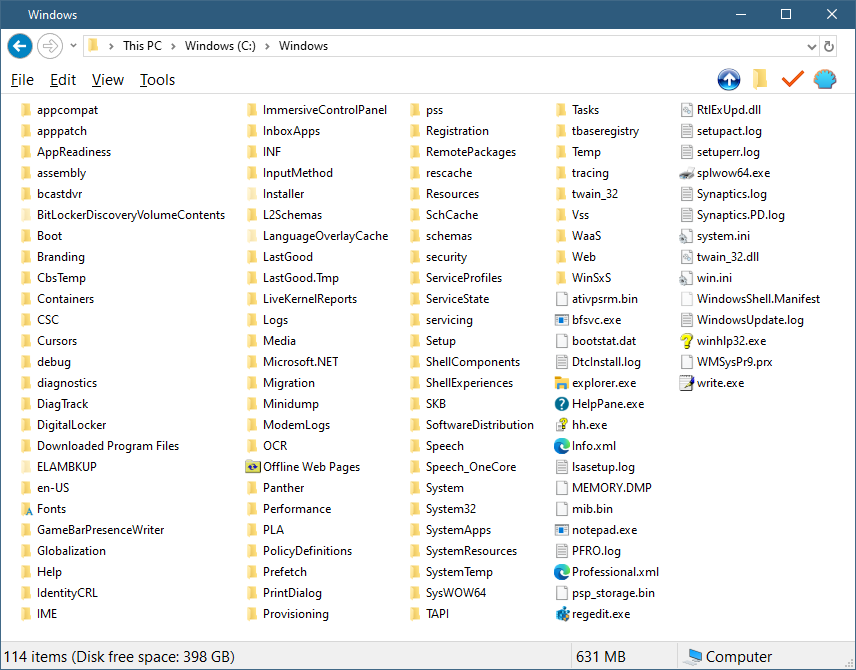
Removing Windoze Exploder Organise bar
- Author:
- Dwayne
- Published in:
- Tech
- Published date:
- Jan 2, 2026 02:37am
- Post ID:
- 39
- Tags:
- tiptechhax
M$ Vent
First off let me tell you how pissed I am at Micro$oft and their stupid "We know what the people want" ways.
Every new iteration of Windoze introduces more bloatware, more spyware, more lame UX GUIs, and less customisation.
Did anyone ask for the "Ribbon" in Windoze Exploder? Hands up who asked for Cortana or Copilot? Hands up if anyone asked Mico$oft to spy on their every move, every key pressed on their keyboard?
Where's all the hands?!?! It seems M$ just decide what the trends are, and then go for it with no consideration for their actual paying customers.
Getting by
It was ages before I was forced to downgrade from Windoze 98 to XP (eXtra Poop). But I got used to XP and managed to hack it to how I liked.
XP became a dog with new apps requiring more power and space, and with a limit of 2GB (true story!) you had to watch low quality AVIs (or DivXs).
I was forced to downgrade to Windoze 7, which has been my go to for many years.
And now, due to Windoze 7 limitations with RAM, no support and no more new driver updates, I was forced to downgrade to Windoze 10.
Windoze 11 has been out for a few years now, and 10 is on it's last leg of support :(
But I refuse, as I have been able to hack around most of the annoying preinstall (FORCED UPON YOU) apps and GUI issues in Windoze 10.
Haxoring Exploder
I managed to remove the "Organize" bar (AKA FolderBand) from Windoze Exploder on Windoze 10 (Pro).
To get your Exploder looking like the one in the image, you'll need a few things.
Requirements
- Firstly I use "Open-Shell Menu" https://open-shell.github.io/Open-Shell-Menu/
which is a replacement shell that changes the Start Menu. It also has fixes for Exploder and the Task Bar.
It's awesome. I've been using it since Windoze 7.Pro-tip:
In Windoze Exploder go to Tools → Folder Options → View (tab) and un-tick "Show status bar".
Then in "Open-Shell Menu", in the "Settings for Classic Explorer" , in the "Status Bar" tab, make sure "Show Status bar" is ticked.
It works and looks better than the built in Windoze one! - Next up is a little hacky app called "OldNewExplorer" https://www.oldnewexplorer.com/
With this you can turn the pesky Ribbon into the old-school Menus! OMG! How do you even use the ribbon. What a piece of garbage! - To manage system files you'll need full access to them. Google ' "Take Ownership" reg file ' for a quick win. You'll find a registry hack that gives you a new "Context Menu" option to "Take Ownership" of files and folders.
If you're a pro you'll now how to do it viatakeownandicacls, or have the know-how with the-oleright-click propertiesmethod and find your way around setting your perms that way.
( IMHO downloading the reg hack is the most dangerous but easiest way ). - You'll also need a tool like "Resource Hacker" that enables you to edit binary files ( exe dll etc (no silly etc is not a file extension) )
There are other tools but Resource Hacker ( https://www.angusj.com/resourcehacker/ ) is very easy to use. - Lastly you'll need to be comfortable on command line. I use Cmder https://cmder.app/ (never leave home without it) instead of Windoze CMD.
- The thing is we need to replace a system file with Exploder closed. And if somethinK goes south, we need to boot into CLI and perform an "undo".
So it might also pay to research "Recovery Mode" if you don't know how to recover broken Windoze.
Let's Do This!
This section is just for the removal of the "FolderBand" and not tweaking the rest of Exploder.
We will be modifying a Windoze system file called shellstyle.dll
If you haven't made any Personalisation tweaks and are using the default Theme, then the file you want is :
C:\Windows\System32\shellstyle.dll
If you've updated your theme at some point then you'll need to modify this one :
C:\Windows\Resources\Themes\aero\Shell\NormalColor\shellstyle.dll
I'm using "Resource Hacker" so you'll probs need this to follow along.
- First take ownership of the
shellstyle.dllfile or the folder it's in (best to do the folder recursively). - Then make a copy of the file (i.e. copy/paste) and call it somethiK like
shellstyle_orig.dll
This is just a backup backup as a final resource if things turn to poop. - Make another copy and call it
shellstylex.dllWe will modify this one. - Now open
shellstylex.dllin Resource Hacker.
[ The left side are the resources, in a folder tree style. ] - Open the UIFILE folder and select "1 : 1033"
On the right you'll see code! Weeeeeee. - We're looking for "FolderBandStyle". Try the search feature ( click on "1 : 1033" then Ctrl-F ) or scroll down to about line 1170.
Around there somewhere we are looking for :or
Depending on whichshellstyle.dllyou're in. It's the same code just one has extra line breaks. - Modify the code by adding
padding="rect(0rp,0rp,0rp,-32rp)"to the Element :This is a little hack to hide the bar
0rp, 0rp, 0rp: Keeps the left, top, and right edges exactly where they are.
-32rp (Bottom): This tells the layout engine that the bottom edge of the FolderBand should be 32 units above its starting point.
The bar is usually 30 so 32 should hide it well. You may need to adjust this number if the bar is showing a little.
(rp = Relative Pixels)
- Anyways, after making the code change, press F5 or go to Action → Modify
- and then save it, Ctrl-S or File → Save
- And close Resource Hacker.
shellstylex.dll is now the modified version we want Windoze Exploder to use.
If you want a quick way to verify the change, open it with notepad and search for "FolderBandStyle"
You should see you change a few lines down form there.
Switching files
As you cleverly named the modified file `shellstylex.dll` you can safely copy it to the folder where the one you wish to modify is.
Remember that's either
C:\Windows\System32\shellstyle.dll
or
C:\Windows\Resources\Themes\aero\Shell\NormalColor\shellstyle.dll
Most likely the latter.
- Now open your terminal with Admin permissions ( hopefully you know what this means and how to!!!
(If not I think you should research before continuing) ) - Change dir to
> cd C:\Windows\System32
or> cd C:\Windows\Resources\Themes\aero\Shell\NormalColor - Kill exploder :
> taskkill /F /IM explorer.exe - Backup
shellstyle.dll> move shellstyle.dll shellstyle_.dll - Replace it with your modded version
> move shellstylex.dll shellstyle.dll - Start Exploder backup
> explorer - Open an exploder window.
HUZZA!!!
All done.
Oops you broke it!
No you did!
No, _you_ did!
Panic ye-not.
You need to boot back into Windoze but in CLI mode with no GUI.
So start you PC up in recovery mode, and choose the command line only option.
Starting up in recovery may be automatic, or you might need a recovery disk/usb.
Or possibly after smashing keys on your keyboard when you PC is starting up might give you that option.
When you get into the CLI,
- Change dir to
> cd C:\Windows\System32
or> cd C:\Windows\Resources\Themes\aero\Shell\NormalColor - Move your modified
shellstyle.dll> move shellstyle.dll shellstyle_oops.dll - Replace with backup
> move shellstyle_.dll shellstyle.dll - I think you can run
explorerfrom there/here, but if not, just reboot your PC.
PC Unbroken!
Closing Notes
This fix also works on Windoze 7 in pretty much the same way with the same files and code.
It pays to do some reading up before haxing Windoze because it can be a dog to recover your stuff.
It's not the easiest UI to use and if you really want your OS to represent you, then give Linux a go. I would suggest Ubuntu as there's a massive community out there for it and it's super easy to use and customise.
- l8s S.J -
[keyword swappiness: Micro$oft → Microsoft, Windoze → Windows, Exploder → Explorer]
2 Comments

Dwayne
January 1nd, 2026 - 3:33AM